
Kia Rio: Floor Console / Console Armrest
Components and components location
| Component Location |
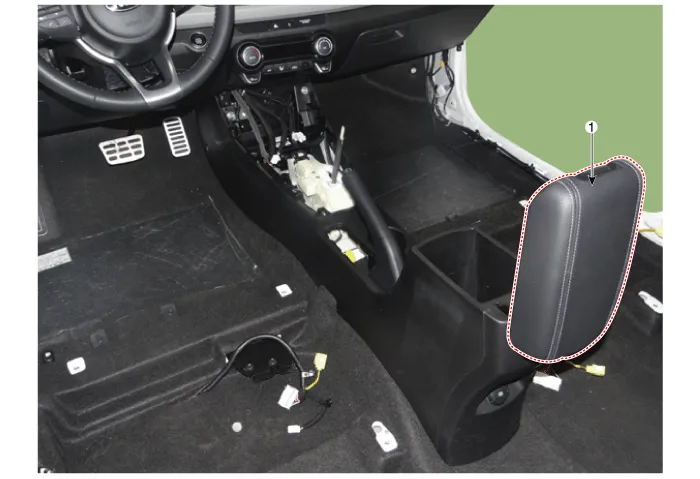
| 1. Console armrest |
Repair procedures
| Replacement |
Put on gloves to protect your hands. |

|

| 1. |
Remove the floor console assembly. (Refer to Floor Console - "Floor Console Assembly") |
| 2. |
Remove the rear console cover. (Refer to Floor Console - "Rear Console Cover") |
| 3. |
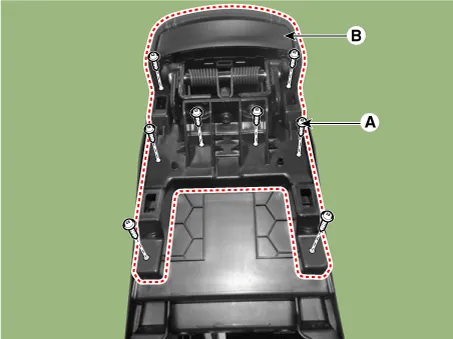
Loosen the mounting screws (A) and remove the console armrest (B).
|
| 4. |
Install in the reverse order of removal.
|
Components and components location Component Location 1. Rear console cover Repair procedures Replacement Put on gloves to protect your hands.
Components and components location Components 1. Front bumper cover assembly 2. Front bumper lower stiffener 3.
Other information:
Kia Rio 2017-2023 YB Service Manual: Rear Washer Switch
Repair procedures Inspection Multifunction Switch Inspection [BCM Type] 1. Check for continuity between the terminals in each switch position as shown below. [Left Handle Drive] Switch Switch position Switch terminal
Kia Rio 2017-2023 YB Service Manual: Air Conditioning System
General safety information and caution Instructions When Handling Refrigerant 1. R-134a liquid refrigerant is highly volatile. A drop on the skin of your hand could result in localized frostbite. When handling the refrigerant, be sure to wear gloves.
Categories
- Manuals Home
- Kia Rio Owners Manual
- Kia Rio Service Manual
- Brake System
- Maintenance
- Engine Mechanical System
- New on site
- Most important about car
