
Kia Rio: Lighting System / Vanity Lamp
Repair procedures
| Removal |
| 1. |
Disconnect the negative (-) battery terminal. |
| 2. |
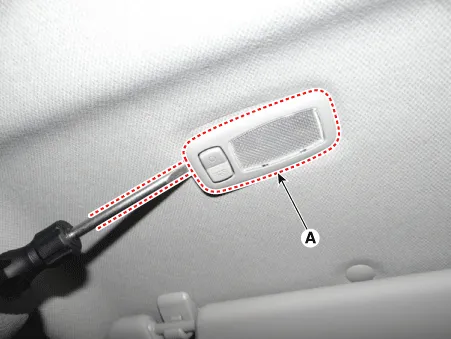
Detach the vanity lamp (A) using a flat-tip screwdriver.
|
| 3. |
Disconnect the vanity lamp connector (A).
|

Bulb Replacement
| 1. |
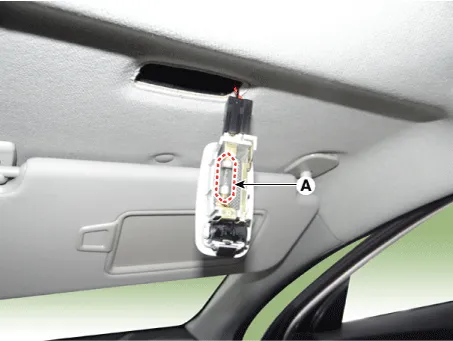
Detach the vanity lamp (A) using a flat-tip screwdriver.
|
| 2. |
Remove the vanity lamp bulb (A).
|
| Installation |
| 1. |
Connect the vanity lamp connector. |
| 2. |
Install the vanity lamp. |
| 3. |
Connect the negative (-) battery terminal. |
Repair procedures Removal • Put on gloves to prevent hand injuries.
Repair procedures Inspection 1. Remove the overhead console lamp assembly then check for continuity between terminals.
Other information:
Kia Rio 2017-2023 YB Service Manual: Immobilizer Control Unit
Repair procedures Removal 1. Disconnect the negative (-) battery terminal. 2. Remove the main crash pad assembly. (Refer to Body - "Main Crash Pad Assembly") 3. Disconnect the connector of the immobilizer unit and then remove the immobilizer unit (A) after
Kia Rio 2017-2023 YB Service Manual: Turn Signal Lamp
Repair procedures Removal Door Mirror Turn Signal Lamp 1. Disconnect the negative (-) battery terminal. 2. Remove the mirror (A) from the mirror holder. Be careful not to damag
Categories
- Manuals Home
- Kia Rio Owners Manual
- Kia Rio Service Manual
- Cooling System
- Engine Oil and Filter
- Timing Chain
- New on site
- Most important about car
