
Kia Rio: Hood / Hood Latch Release Handle
Components and components location
| Component Location |
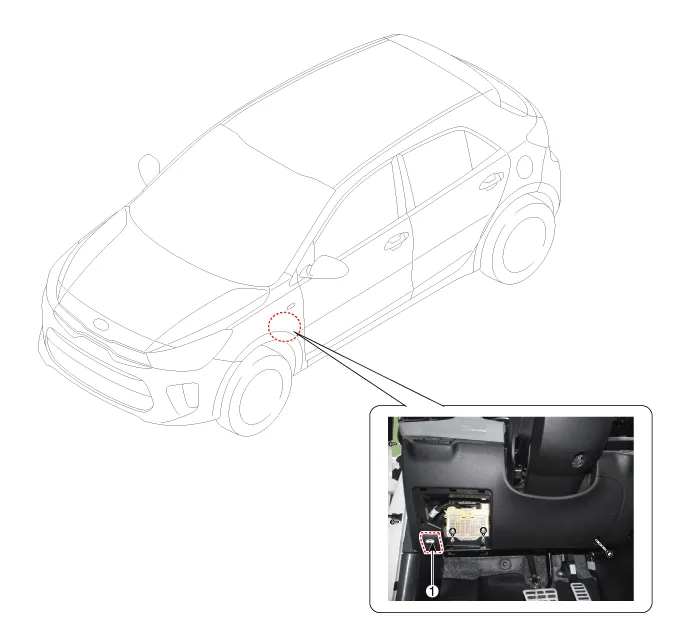
| 1. Hood latch release handle
|
Repair procedures
| Replacement |
• Put on gloves to protect your hands. |

|

| 1. |
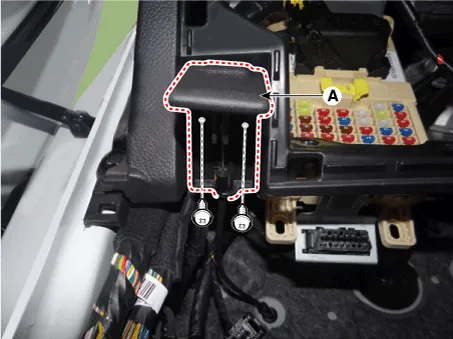
Separate the hood latch release handle cable (A) after loosening the mounting screws.
|
| 2. |
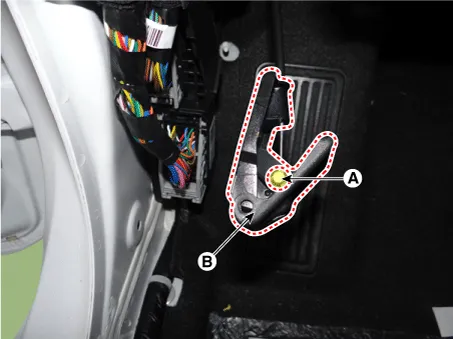
Disconnect the hood latch release handle cable (A) and then remove the hood latch handle (B).
|
| 3. |
Install in the reverse order of removal.
|
Repair procedures Replacement 1. Using a clip remover, detach the clips, and remove the hood insulator pad (A). Be careful not to damage the hood and body.
Components and components location Component Location 1. Hood lower latch assembly Repair procedures Replacement 1.
Other information:
Kia Rio 2017-2023 YB Service Manual: License Lamps
Repair procedures Removal 1. Disconnect the negative (-) battery terminal. 2. Remove the license lamp assembly (A) after pressing the locking pin. 3. Disconnect the license lamp connector (A).
Kia Rio 2017-2023 YB Service Manual: Climate Control Air Filtar
Description and operation Description The climate control air filter is located in the bower unit. It eliminates foreign materials and odor. The particle filter performs a role as an odor filter as well as a conventional dust filter to ensure comfortable interior environment.
Categories
- Manuals Home
- Kia Rio Owners Manual
- Kia Rio Service Manual
- Body (Interior and Exterior)
- Maintenance Schedule
- Fuse/relay panel description
- New on site
- Most important about car
