
Kia Rio: Crash Pad / Steering Column Shroud Panel
Components and components location
| Component Location |
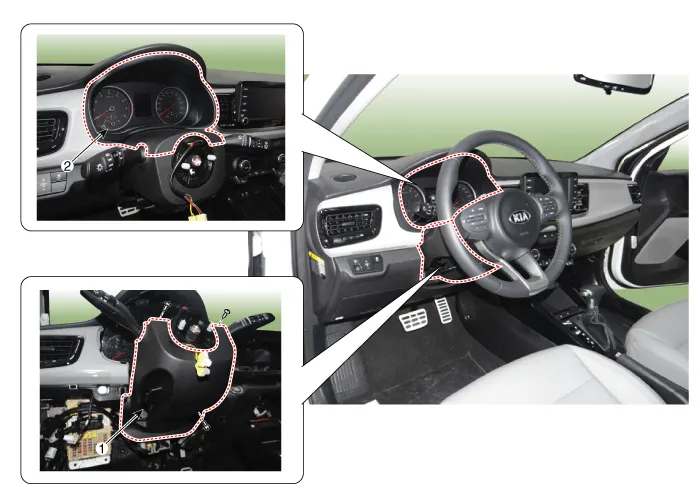
| 1. Steering column shroud lower
panel |
2. Steering column shroud upper
panel |
Repair procedures
| Replacement |
[Steering column shroud upper panel]
Put on gloves to protect your hands. |

|

| 1. |
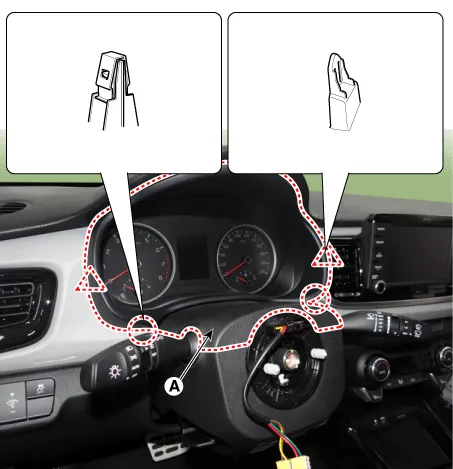
Remove the steering column shroud upper panel (A) by using a remover.
|
| 2. |
Install in the reverse order of removal.
|
[Steering column shroud lower panel]
| 1. |
Remove the Steering column shroud upper panel. |
| 2. |
Remove the crash pad lower panel. (Refer to Crash Pad - "Crash Pad Lower Panel") |
| 3. |
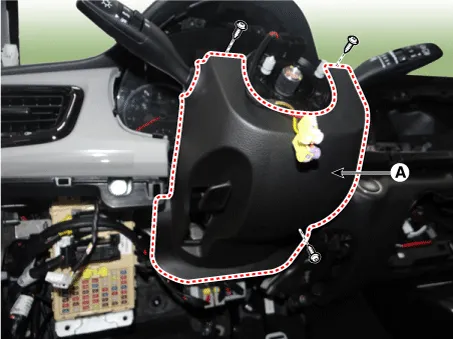
Remove the steering column shroud lower panel (A) after loosening the mounting screws.
|
| 4. |
Install in the reverse order of removal.
|
Components and components location Component Location 1. Glove box housing assembly Repair procedures Replacement Put on gloves to protect your hands.
Components and components location Component Location 1. Crash pad center lower panel Repair procedures Replacement Put on gloves to protect your hands.
Other information:
Kia Rio 2017-2023 YB Service Manual: Seat Heater
Components and components location Component Location 1. Seat heater unit (Passenger seat only) 2. Front seat back heater 3. Front seat cushion heater Schematic diagrams Circuit Diagram Repair procedures Inspection 1.
Kia Rio 2017-2023 YB Service Manual: Refrigerant line
Repair procedures Replacement 1. Discharge refrigerant from refrigeration system. 2. Replace faulty tube or hose. Cap the open fittings immediately to keep moisture or dirt out of the system.
Categories
- Manuals Home
- Kia Rio Owners Manual
- Kia Rio Service Manual
- Maintenance Schedule
- Steering System
- Engine Oil and Filter
- New on site
- Most important about car
