
Kia Rio: Lighting System / Overhead Console Lamp
Repair procedures
| Inspection |
| 1. |
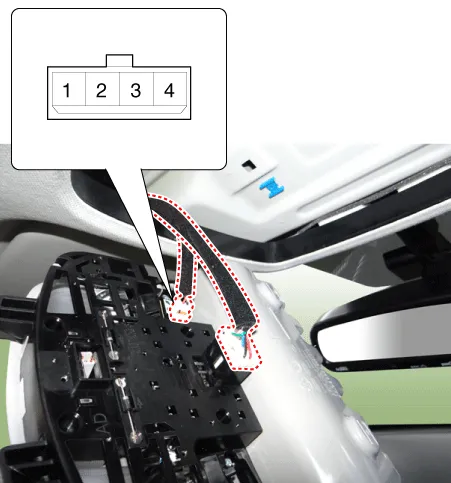
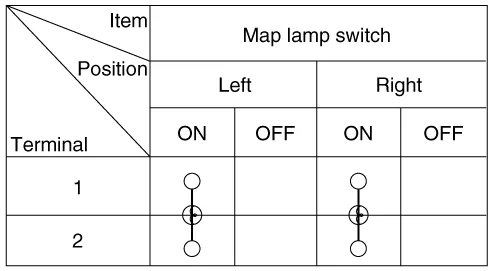
Remove the overhead console lamp assembly then check for continuity between terminals. If the continuity is not as specified, replace the map lamp switch.
|
| Removal |
| 1. |
Disconnect the negative (-) battery terminal. |
| 2. |
Remove the two mounting screws. And then remove the overhead console (A).
|

| 3. |
Remove the overhead console after disconnecting the connectors (A).
|

| Installation |
| 1. |
Install the overhead console lamp after connecting the connector. |
| 2. |
Install the lens after tightening 2 screws. |
Repair procedures Removal 1. Disconnect the negative (-) battery terminal. 2. Detach the vanity lamp (A) using a flat-tip screwdriver.
Repair procedures Inspection 1. Check for continuity between terminals. If the continuity is not as specified, replace the hazard lamp switch.
Other information:
Kia Rio 2017-2023 YB Service Manual: Horn
Components and components location Component Location 1. Horn switch 2. Horn relay 3. Horn 4. Clock spring Repair procedures Removal 1. Remove the front bumper assembly.
Kia Rio 2017-2023 YB Service Manual: Power Door Lock Module
Components and components location Components 1. Door lock/unlock knob cable 2. Door latch assembly Repair procedures Inspection • When removing with a flat-tip screwdriver or remover, wrap
Categories
- Manuals Home
- Kia Rio Owners Manual
- Kia Rio Service Manual
- Restraint
- Timing Chain
- Maintenance
- New on site
- Most important about car
