
Kia Rio: Lighting System / Vanity Lamp
Repair procedures
| Removal |
| 1. |
Disconnect the negative (-) battery terminal. |
| 2. |
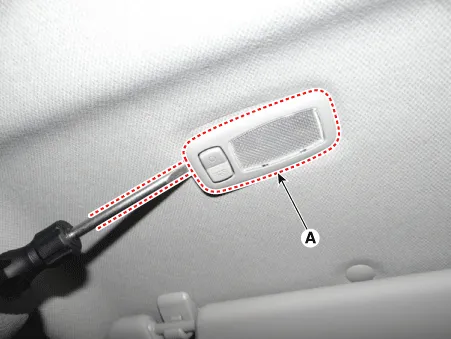
Detach the vanity lamp (A) using a flat-tip screwdriver.
|
| 3. |
Disconnect the vanity lamp connector (A).
|

Bulb Replacement
| 1. |
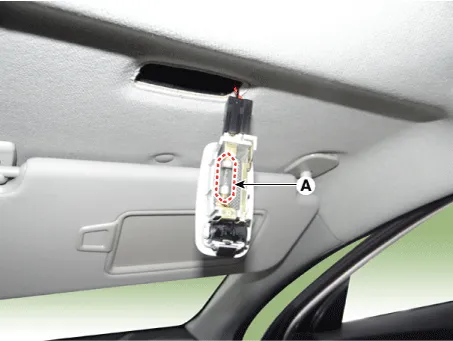
Detach the vanity lamp (A) using a flat-tip screwdriver.
|
| 2. |
Remove the vanity lamp bulb (A).
|
| Installation |
| 1. |
Connect the vanity lamp connector. |
| 2. |
Install the vanity lamp. |
| 3. |
Connect the negative (-) battery terminal. |
Repair procedures Removal • Put on gloves to prevent hand injuries.
Repair procedures Inspection 1. Remove the overhead console lamp assembly then check for continuity between terminals.
Other information:
Kia Rio 2017-2023 YB Service Manual: Keyless Entry And Burglar Alarm
Specifications Specification Item Specification Power source 3 V Operating temperature -22 - 176°F (-30 - 80°C) RF Modulation FSK LF Modulation ASK RF frequency
Kia Rio 2017-2023 YB Service Manual: Heating,Ventilation, Air Conditioning
Specifications Specification Air Conditioner Item Specification Compressor Type DVE12 Oil type & Capacity PAG 30, 120 ± 10 g Displacement 122 cc/rev Expansion valve Type
Categories
- Manuals Home
- Kia Rio Owners Manual
- Kia Rio Service Manual
- Brake System
- Maintenance Schedule
- Motor Driven Power Steering
- New on site
- Most important about car
