
Kia Rio: Lubrication System / Oil Pressure Switch
Repair procedures
| Removal and Installation |
| 1. |
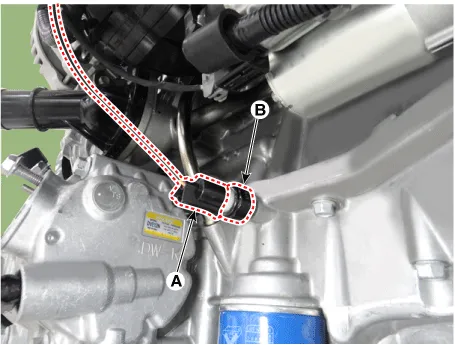
Disconnect the oil pressure switch connector (A) and then remove the oil pressure switch (B).
|
| 2. |
Install in the reverse order of removal.
|

| Inspection |
| 1. |
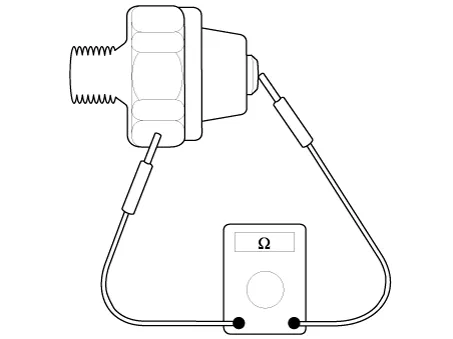
Check the continuity between the terminal and the body with an ohmmeter. If there is no continuity, replace the oil pressure switch.
|
| 2. |
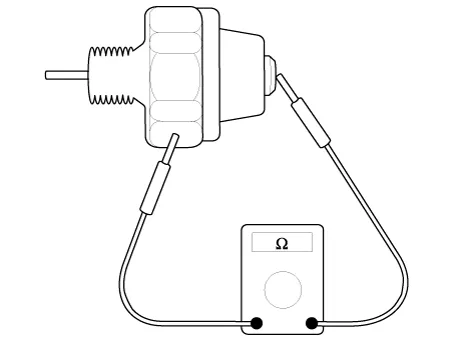
Check the continuity between the terminal and the body when the fine wire is pushed. If there is continuity even when the fine wire is pushed, replace the switch. |
| 3. |
If there is no continuity when a 50 kPa (0.50 kgf/cm², 7.25 psi) is applied through the oil hole, the switch is operaing properly. Check for air leakage. If air leaks, the diaphragm is broken. Replace it.
|
Flow diagram Flow Diagram Repair procedures Engine Oil And Filter Replacement • Prolonged and repeated contact with mineral oil will result in the removal of natural fats from the skin, leading to dryness, irritation and dermatitis.
Components and components location Components 1. Oil screen O-ring 2. Oil screen 3. Oil pan 4. Drain plug gasket 5.
Other information:
Kia Rio 2017-2023 YB Service Manual: Rear Wiper/Washer
C
Kia Rio 2017-2023 YB Service Manual: PTC Heater
Description and operation Description The PTC (Positive Temperature Coefficient) heater is installed at the exit or the backside of heater core. The PTC heater is an electric heater using a PTC element as an auxiliary heating device that supplements deficiency of interior heat source in highly effective diesel engine.
Categories
- Manuals Home
- Kia Rio Owners Manual
- Kia Rio Service Manual
- Maintenance
- CVVT & Camshaft
- Heating,Ventilation, Air Conditioning
- New on site
- Most important about car
