
Kia Rio: AVN System / AVN(Audio Video Navigation) head unit
Components and components location
| Components |

Connector Pin Information
|
No. |
Connector A |
Connector B |
|
1 |
Rear door left speaker (+) |
- |
|
2 |
Rear door left speaker (-) |
MIC (+) |
|
3 |
- |
- |
|
4 |
- |
- |
|
5 |
- |
Antenna power |
|
6 |
Camera Power |
Illumination (+) |
|
7 |
Camera Video |
Multimedia-CAN (High) |
|
8 |
- |
- |
|
9 |
- |
ALT Left_output (-) |
|
10 |
AUX Audio right_input |
Battery (+) |
|
11 |
AUX Detect |
Battery (+) |
|
12 |
Steering wheel remote controller |
Ground |
|
13 |
Front door left speaker (+) |
Ground |
|
14 |
Front door left speaker (-) |
MIC (Ground) |
|
15 |
Front door right speaker (-) |
MIC (-) |
|
16 |
Front door right speaker (+) |
- |
|
17 |
- |
- |
|
18 |
- |
- |
|
19 |
- |
Illumination (-) |
|
20 |
Camera Power_Ground |
Multimedia-CAN (Low) |
|
21 |
Camera Video_Ground |
- |
|
22 |
- |
ACC |
|
23 |
- |
- |
|
24 |
AUX Audio left_input |
- |
|
25 |
AUX Audio ground |
Reverse |
|
26 |
Steering wheel remote controller (Ground) |
Door open |
|
27 |
Rear door right speaker (-) |
Door unlock_status |
|
28 |
Rear door right speaker (+) |
Manual parking |
|
29 |
- |
'P' Position |
|
30 |
- |
Auto light |
|
31 |
- |
- |
|
32 |
- |
- |
|
33 |
Camera shield_Ground |
IGN1 |
|
34 |
- |
- |
|
35 |
- |
- |
|
36 |
- |
|
|
37 |
- |
|
|
38 |
Vehicle speed |

Repair procedures
| Removal |
|

| 1. |
Disconnect the negative (-) battery terminal. |
| 2. |
Remove the center fascia duct assembly. (Refer to Body - "Center Fascia Panel") |
| 3. |
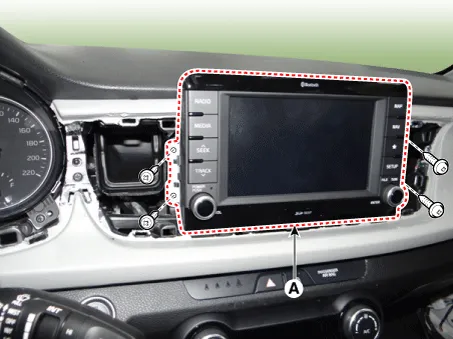
Remove the AVN head unit (A) after loosening the mounting screws.
|
| 4. |
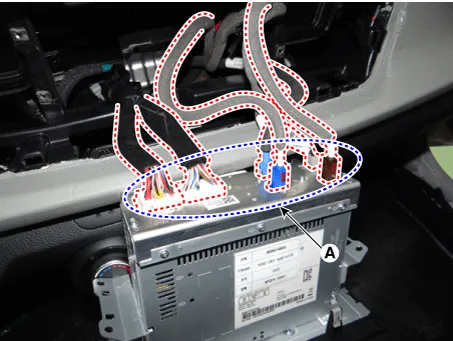
Remove the AVN head unit after disconnecting the connectors and antenna cable (A).
|
| Installation |
| 1. |
Connect the AVN head unit connectors and antenna cable. |
| 2. |
Install the AVN head unit. |
| 3. |
Install the center fascia duct assembly. |
| 4. |
Connect the negative (-) battery terminal. |
|

Components and components location Component Location 1 . AVN head unit 2. Roof antenna (Radio+GPS+DAB) 3 . Multimedia jack 4 .
Repair procedures Inspection Troubleshooting of the speakers When handling the speakers : • Do not cause shock to the speakers by dropping or throwing them.
Other information:
Kia Rio 2017-2023 YB Service Manual: License Lamps
Repair procedures Removal 1. Disconnect the negative (-) battery terminal. 2. Remove the license lamp assembly (A) after pressing the locking pin. 3. Disconnect the license lamp connector (A).
Kia Rio 2017-2023 YB Service Manual: Rear Washer Motor
Repair procedures Inspection 1. With the washer motor connected to the reservoir tank, fill the reservoir tank with water. Before filling the reservoir tank with water, check the filter for foreign material or conta
Categories
- Manuals Home
- Kia Rio Owners Manual
- Kia Rio Service Manual
- Fuse/relay panel description
- Clutch System
- Maintenance
- New on site
- Most important about car
