
Kia Rio: Crash Pad / Center Fascia Panel
Components and components location
| Component Location |
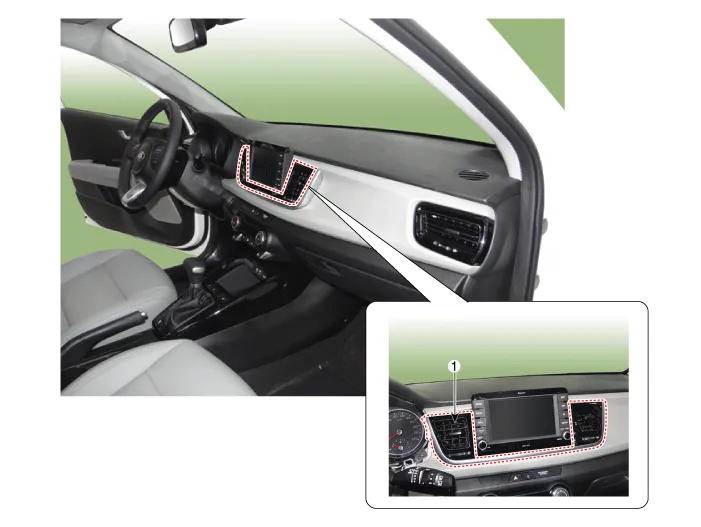
| 1. Center fascia panel assembly
|
Repair procedures
| Replacement |
Put on gloves to protect your hands. |

|

| 1. |
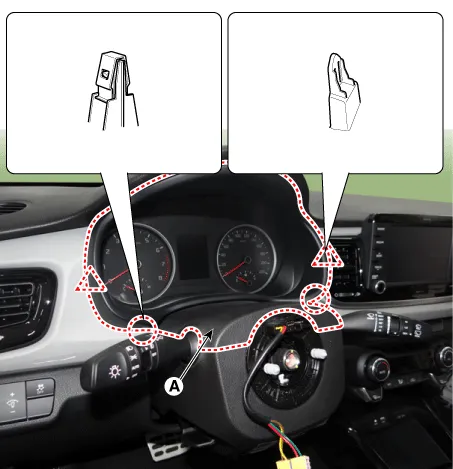
Remove the cluster fascia panel (A) by using a remover.
|
| 2. |
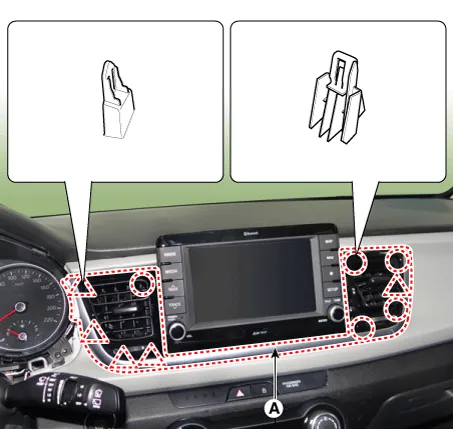
Remove the center fascia panel (A) by using a remover.
|
| 3. |
Install in the reverse order of removal.
|
Components and components location Component Location 1. Cluster fascia panel Repair procedures Replacement Put on gloves to protect your hands.
Components and components location Component Location 1. Crash pad passenger side panel assembly Repair procedures Replacement Put on gloves to protect your hands.
Other information:
Kia Rio 2017-2023 YB Service Manual: Rear Combination Lamp
Repair procedures Removal Rear Combination Lamp (Outside) 1. Disconnect the negative (-) battery terminal. 2. Remove the rear combination lamp (A) after loosening the mounting screws. 3.
Kia Rio 2017-2023 YB Service Manual: Front Washer Motor
Repair procedures Inspection Front Washer Motor 1. With the washer motor connected to the reservoir tank, fill the reservoir tank with water. • Before filling the reservoir tank wi
Categories
- Manuals Home
- Kia Rio Owners Manual
- Kia Rio Service Manual
- Cooling System
- Engine Electrical System
- Engine Mechanical System
- New on site
- Most important about car
