
Kia Rio: Button Engine Start System / Start/Stop Button
Components and components location
| Component |
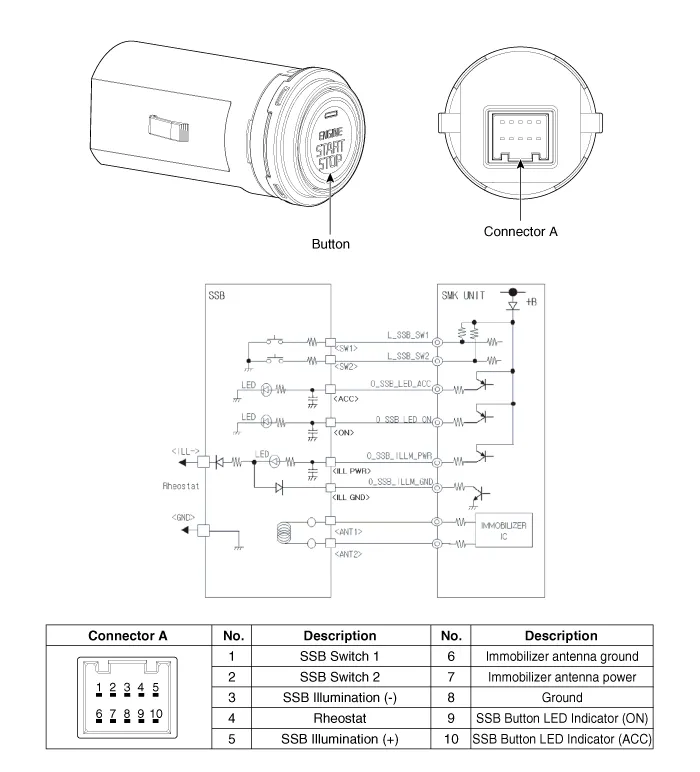
Repair procedures
| Removal |
| 1. |
Disconnect the negative (-) battery terminal. |
| 2. |
Remove the crash pad center lower panel. (Refer to Body - "Crash Pad Center Panel") |
| 3. |
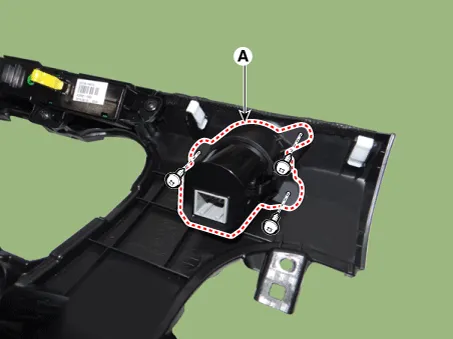
Remove the start/stop button (A) after loosening the mounting screws.
|
| Installation |
| 1. |
Install the start/stop button. |
| 2. |
Install the crash pad center lower panel. |
| 3. |
Connect the negative (-) battery terminal. |
Components and components location Component Location 1. Body control module (BCM) 2. Smart key unit (SMK) 3. Interior antenna 1 4.
Components and components location Component Repair procedures Removal 1. Disconnect the negative(-) battery terminal.
Other information:
Kia Rio 2017-2023 YB Service Manual: Power Door Lock Switch
Repair procedures Removal • When removing with a flat-tip screwdriver or remover, wrap protective tape around the tools to prevent damage to components.
Kia Rio 2017-2023 YB Service Manual: Power Door Mirror Switch
Components and components location Component Driver Power Window Switch Schematic diagrams Circuit Diagram [Non-Folding Mirror Type] [Folding Mirror Type] Repair procedures Removal 1.
Categories
- Manuals Home
- Kia Rio Owners Manual
- Kia Rio Service Manual
- Brake System
- Engine Control / Fuel System
- Body (Interior and Exterior)
- New on site
- Most important about car
