
Kia Rio: Drive Belt System / Drive Belt Tensioner
Repair procedures
| Removal and Installation |
| 1. |
Remove the engine room under cover. (Refer to Engine and Transaxle Assembly - "Engine Room Under Cover") |
| 2. |
Remove the drive belt. (Refer to Drive Belt System - "Drive Belt") |
| 3. |
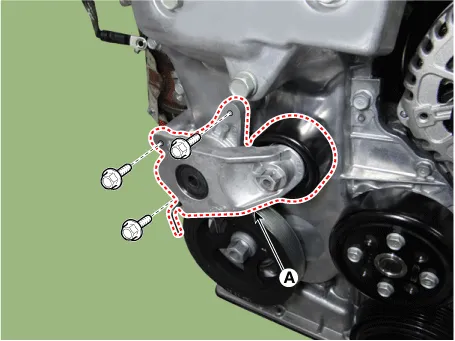
Remove the drive belt tensioner (A).
|
| 4. |
Install in the reverse order of removal. |
| Inspection |
Check the drive belt tensioner for excessive foreign substances, crack, damage or sticking of pivot shaft. Replace if necessary.
Repair procedures Removal and Installation 1. Remove the engine room under cover. (Refer to Engine and Transaxle Assembly - "Engine Room Under Cover") 2.
Repair procedures Removal and Installation 1. Remove the engine room front under cover and RH side cover. (Refer to Engine and Transaxle Assembly - "Engine Room Under Cover") 2.
Other information:
Kia Rio 2017-2023 YB Service Manual: Power Door Lock Module
Components and components location Components 1. Door lock/unlock knob cable 2. Door latch assembly Repair procedures Inspection • When removing with a flat-tip screwdriver or remover, wrap
Kia Rio 2017-2023 YB Service Manual: Rear Washer Switch
Repair procedures Inspection Multifunction Switch Inspection [BCM Type] 1. Check for continuity between the terminals in each switch position as shown below. [Left Handle Drive] Switch Switch position Switch terminal
Categories
- Manuals Home
- Kia Rio Owners Manual
- Kia Rio Service Manual
- Engine Mechanical System
- Filler-Neck Assembly
- Maintenance
- New on site
- Most important about car
