
Kia Rio: Body Side Molding / Front Mud Guard
Repair procedures
| Replacement |
Put on gloves to protect your hands. |

|

| 1. |
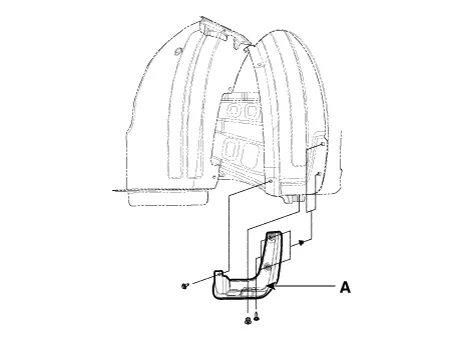
Remove the front mud guard (A), after loosening the mounting screws.
|
| 2. |
Install in the reverse order of removal.
|
Repair procedures Replacement Put on gloves to protect your hands. • Use a plastic panel removal tool to remove interior trim pieces without marring the surface.
Repair procedures Replacement Put on gloves to protect your hands. • Use a plastic panel removal tool to remove interior trim pieces without marring the surface.
Other information:
Kia Rio 2017-2023 YB Service Manual: High Mounted Stop Lamp
Repair procedures Removal 1. Disconnect the negative (-) battery terminal. 2. Open the tailgate. 3. Remove the high mounted stop lamp (A) after loosening the mounting nuts.
Kia Rio 2017-2023 YB Service Manual: Rear Wiper Motor
Repair procedures Inspection Rear Wiper Motor 1. Remove the connector from the rear wiper motor. 2. Connect positive (+) battery cables to terminal 4 and negative (-) battery cables to terminal 3 respectively.
Categories
- Manuals Home
- Kia Rio Owners Manual
- Kia Rio Service Manual
- Motor Driven Power Steering
- Restraint
- Maintenance Schedule
- New on site
- Most important about car
