
Kia Rio: Rear Parking Assist System / Parking Assist Sensor
Components and components location
| Components |
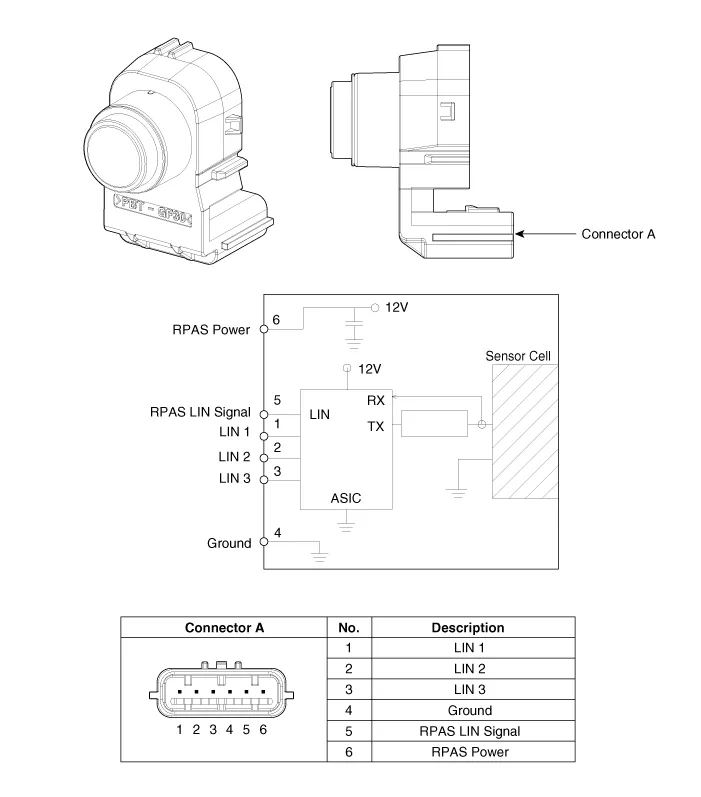
Repair procedures
| Removal |
| 1. |
Disconnect the negative (-) battery terminal. |
| 2. |
Remove the rear bumper assembly. (Refer to Body - "Rear Bumper Assembly") |
| 3. |
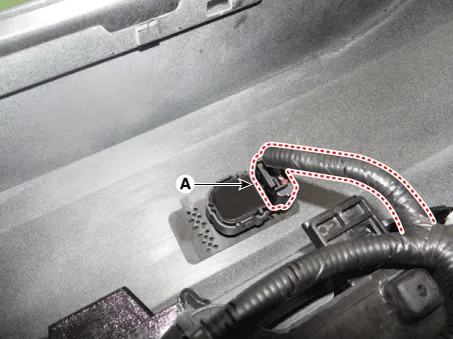
Disconnect the connector (A) from the ultrasonic sensor.
|
| 4. |
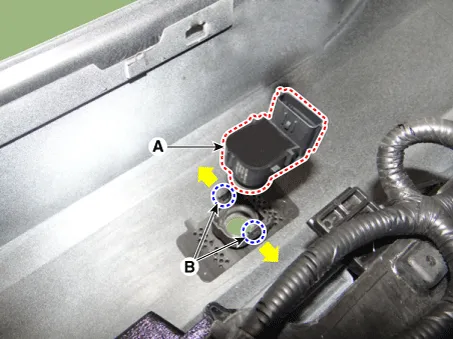
Pull out ths ultrasonic sensor (A) by opening the sensor holder (B) out.
|
| Installation |
| 1. |
Install the ultrasonic sensor and connector. |
| 2. |
Install the rear bumper assembly. |
| 3. |
Connect the negative (-) battery terminal. |
Specifications Specification Item Specification Ultrasonic sensor Voltage rating DC 12V Detecting range 11.
Other information:
Kia Rio 2017-2023 YB Service Manual: Power Window Switch
Components and components location Components Driver Power Window Switch Connector Pin Information [Front / Rear Driver Safety - Auto Up/Down] [LHD] No. Description No. Description 1 Front right power window (Up) 10
Kia Rio 2017-2023 YB Service Manual: Auto Defogging Sensor (FATC only)
Description and operation Description The Auto Defogging Sensor is installed on front windshild glass. The Auto Defogging Sensor senses moisture on the windshild. The air conditioner control module receives the signal from the sensor and eliminate the fog by controlling the intake actuator, A/C, auto defogging actuator, blower m
Categories
- Manuals Home
- Kia Rio Owners Manual
- Kia Rio Service Manual
- Maintenance Schedule
- Brake System
- Restraint
- New on site
- Most important about car
