
Kia Rio: AVN System / Mic
Repair procedures
| Inspection |
| 1. |
Disconnector the negative (-) battery terminal. |
| 2. |
Remove the overhead console lamp. (Refer to Lighting System - "Overhead Console Lamp") |
| 3. |
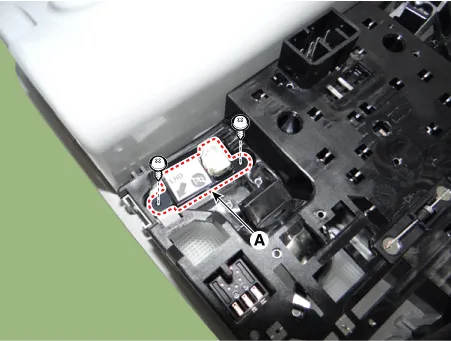
Remove the hands free mic (A) after loosening the mounting screws.
|
| 4. |
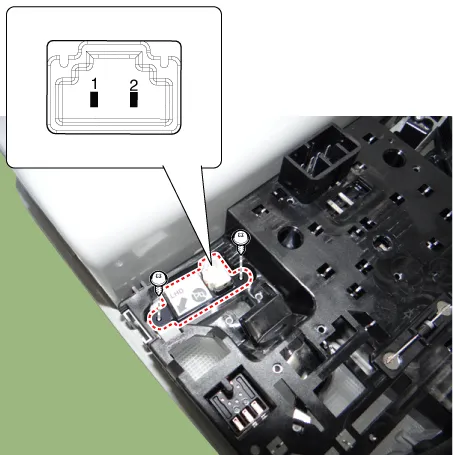
Check tshe continuity of between terminals.
|
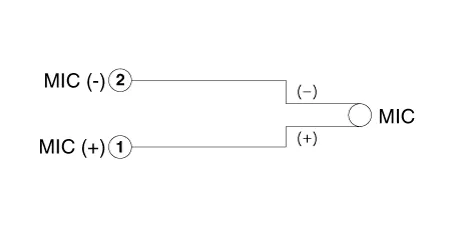
Schematic diagrams Circuit Diagram Description and operation Description The multimedia jack on the console upper cover is for customers who like to listen to external portable music players like the MP3 etc.
Components and components location Component Location 1. Back view camera 2. AVN head unit 3. Steering angle sensor Description and operation Description 1.
Other information:
Kia Rio 2017-2023 YB Service Manual: Rheostat
Components and components location Components Repair procedures Removal 1. Disconnect the negative (-) battery terminal. 2. Remove the crash pad lower panel. (Refer to Body - "Crash Pad Lower Panel") 3.
Kia Rio 2017-2023 YB Service Manual: Intake Actuator
Description and operation Description The intake actuator is located at the blower unit. It regulates the intake door by signal from control unit. Pressing the intake selection switch will shift between recirculation and fresh air modes.
Categories
- Manuals Home
- Kia Rio Owners Manual
- Kia Rio Service Manual
- Cooling System
- Clutch System
- Engine Mechanical System
- New on site
- Most important about car
