
Kia Rio: Rear Seat / Rear Seat Cushion Cover
Components and components location
| Component Location |
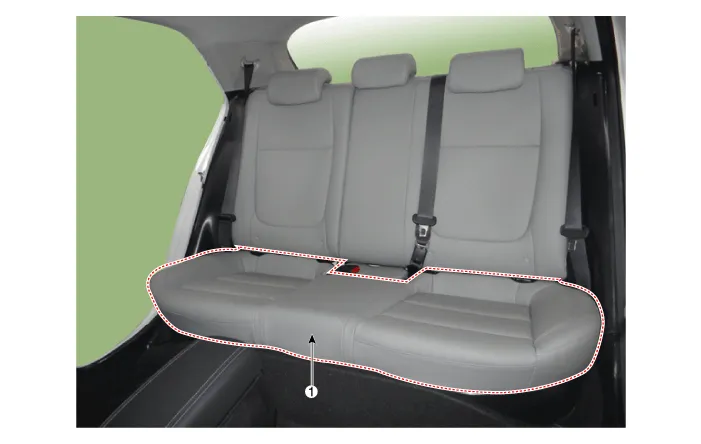
| 1. Rear seat cushion cover
|
Repair procedures
| Replacement |
Put on gloves to protect your hands. |

|

| 1. |
Remove the seat assembly. (Refer to Rear Seat - "Rear Seat Assembly") |
| 2. |
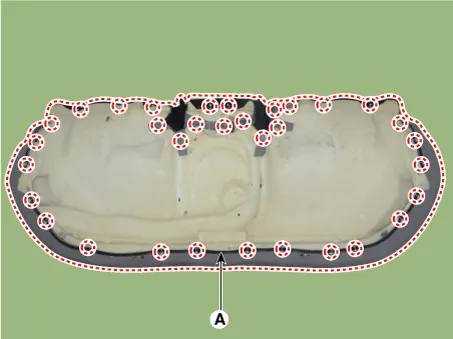
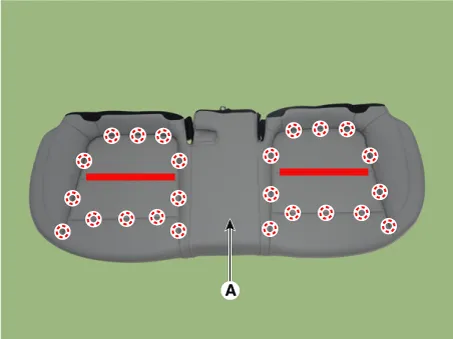
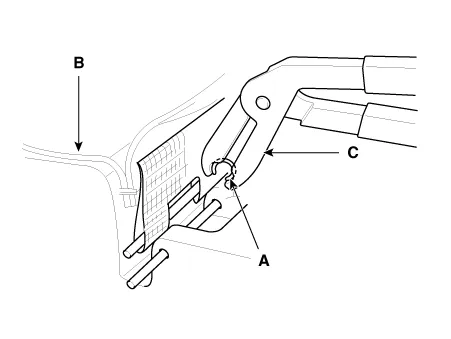
Remove the rear seat cushion cover (A) after removing the hog-ring clips on the rear of seat cushion cover.
|
| 3. |
Install in the reverse order of removal.
|
Components and components location Component Location 1. Rear seat back cover [LH] 2. Rear seat back cover [RH] Repair procedures Replacement Put on gloves to protect your hands.
Other information:
Kia Rio 2017-2023 YB Service Manual: Overhead Console Lamp
Repair procedures Inspection 1. Remove the overhead console lamp assembly then check for continuity between terminals. If the continuity is not as specified, replace the map lamp switch. Removal 1.
Kia Rio 2017-2023 YB Service Manual: Smart Key
Repair procedures Smart Key Smart Key Code Saving 1. Connect the DLC cable of KDS/GDS to the data link connector (16 pins) in driver side crash pad lower panel, turn the power on KDS/GDS. 2. Select the vehicle model and then do "Smart key code saving".
Categories
- Manuals Home
- Kia Rio Owners Manual
- Kia Rio Service Manual
- Cooling System
- Body Electrical System
- Suspension System
- New on site
- Most important about car
