
Kia Rio: Hood / Hood Assembly
Components and components location
| Component Location |

| 1. Hood assembly |
Repair procedures
| Replacement |
Be careful not to damage the hood and body. |

|

| 1. |
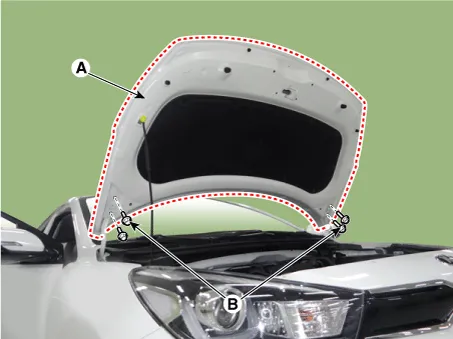
Remove the hood assembly (A) after loosening the hood hinge (B) mounting bolts.
|
| 2. |
Install in the reverse order of removal.
|
Repair procedures Adjustment 1. After loosening the hinge (A) mounting bolts, adjust the hood (B) by moving it up and down, or right and left.
Repair procedures Replacement 1. Using a clip remover, detach the clips, and remove the hood insulator pad (A). Be careful not to damage the hood and body.
Other information:
Kia Rio 2017-2023 YB Service Manual: Headlamps
Description and operation Description BI-FUNCTION 1. Definition – A headlamp with integrated functions of high and low beam – The light is controlled by rotating the shield inserted to the lens.
Kia Rio 2017-2023 YB Service Manual: Condenser
Repair procedures Inspection 1. Check the condenser fins for clogging and damage. If clogged, clean them with water, and blow them with compressed air. If bent, gently bend them using a screwdriver or pliers. 2.
Categories
- Manuals Home
- Kia Rio Owners Manual
- Kia Rio Service Manual
- CVVT & Camshaft
- Engine Oil and Filter
- Filler-Neck Assembly
- New on site
- Most important about car
