
Kia Rio: ESC (Electronic Stability Control) System / Emergency Signal System
Description and operation
| Description |
Introduction of quick brake warning system (ESS)
In case of quick brake by driver, the brake lamp or turn signal is blinked to warn against the vehicle at rear.

| 1. |
Basic function (Blinking the brake lamp/emergency lamp)
|
| 2. |
Additional function (Blinking the turn signal)
|

System configuration

ESS Circuit diagram
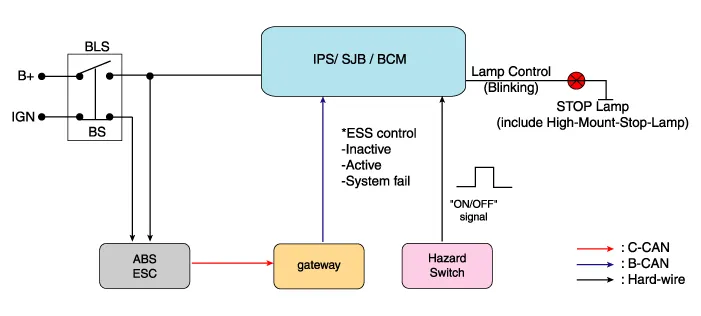
Description and operation Description 1. The ESC OFF switch is for the user to turn off the ESC system. 2.
Description and operation Description – AEB system is designed to help avoid a potential collision or reduce its impact when drivers applies inadequate, delayed or no brakes at all to avoid a collision.
Other information:
Kia Rio 2017-2023 YB Service Manual: Antenna Coil
Repair procedures Removal 1. Disconnect the negative (-) battery terminal. 2. Remove the crash pad lower panel. (Refer to Body - "Crash Pad Lower Panel") 3. Remove the steering column upper and lower shroud panel.
Kia Rio 2017-2023 YB Service Manual: Rear Glass Defogger Printed Heater
Repair procedures Inspection • Wrap tin foil around the end of the voltmeter test lead to prevent damaging the heater line. Apply pressure on the tin foil with hand and move the tin foil along the grid line to check for open circ
Categories
- Manuals Home
- Kia Rio Owners Manual
- Kia Rio Service Manual
- Engine Control / Fuel System
- Clutch System
- Heating,Ventilation, Air Conditioning
- New on site
- Most important about car
