
Kia Rio: Lighting / Lighting control

■ Type A
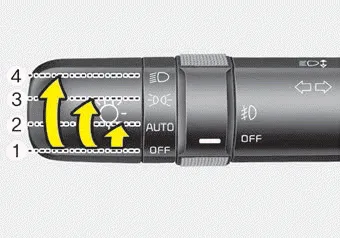
■ Type B
The light switch has a Headlight and a Parking light position.
To operate the lights, turn the knob at the end of the control lever to one of the following positions:
(1) OFF position
(2) Auto light position (if equipped)
(3) Parking light position
(4) Headlight position
Headlight escort function (if equipped) The headlights (and/or taillights) will remain on for approximately 5 minutes after the ignition key is removed or turned to the ACC or LOCK position.
■ Type A ■ Type B When the light switch is in the parking light position (3rd position), the tail, position, license and instrument panel lights will turn ON.
Other information:
Kia Rio 2017-2023 YB Service Manual: Room Lamp
Repair procedures Removal • Put on gloves to prevent hand injuries. • When removing with a flat-tip screwdriver or remover, wrap protective tape around the tools to prevent damage to componen
Kia Rio 2017-2023 YB Service Manual: Power Door Mirror Switch
Components and components location Component Driver Power Window Switch Schematic diagrams Circuit Diagram [Non-Folding Mirror Type] [Folding Mirror Type] Repair procedures Removal 1.
Categories
- Manuals Home
- Kia Rio Owners Manual
- Kia Rio Service Manual
- Restraint
- Suspension System
- Maintenance
- New on site
- Most important about car
