
Kia Rio: Lighting / Front fog light
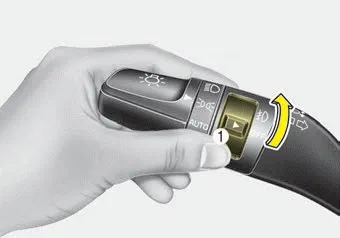
Type A
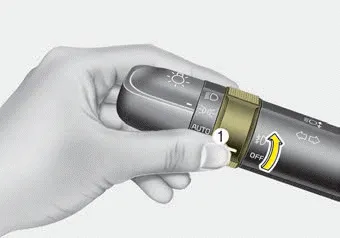
Type B
Fog lights are used to provide improved visibility when visibility is poor due to fog, rain or snow, etc. The fog lights will turn on when the fog light switch (1) is turned to the on position after the headlights are turned on.
To turn off the fog lights, turn the switch (1) to the off position.
When in operation, the fog lights consume large amounts of vehicle electrical power. Only use the fog lights when visibility is poor.
■ Type A ■ Type B The ignition switch must be on for the turn signals to function. To turn on the turn signals, move the lever up or down (A).
Front ■ Type A ■ Type B Rear (5 Door, if equipped) ■ Type A ■ Type B A : Wiper speed control (front) · HI – High wiper speed · LO – Low wiper speed · INT – Intermittent wipe · AUTO* – Automatic control wipe · OFF – Off · MIST – Single wipe B : Intermittent control wipe time adjustment C :Wash with brief wipes (front)* D : Rear wiper/washer control · /ON – Continuous wipe · O/OFF – Off · HI – High wiper speed · LO – Low wiper speed E :Wash with brief wipes (rear)
Other information:
Kia Rio 2017-2023 YB Service Manual: Lighting System
Specifications Specification Item Type Bulb Watt (W) Front Headlamp Halogen Low/High H4 LL 55/60 Turn signal lamp PY21W 21 Position lamp W5W
Kia Rio 2017-2023 YB Service Manual: Cluster Ionizer (FATC only)
Description and operation Description The cluster ionizer helps to clean up odors in the vehicle or from the air-conditioner system. When the ignition switch ON, the inoizer runs a "CLEAN" mode and then a "ION" mode, switching every about 15 minutes.
Categories
- Manuals Home
- Kia Rio Owners Manual
- Kia Rio Service Manual
- Heating,Ventilation, Air Conditioning
- Restraint
- Engine Mechanical System
- New on site
- Most important about car
