
Kia Rio: Features of your vehicle / Automatic climate control system
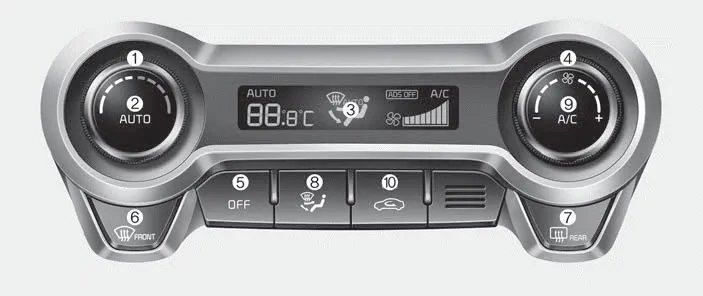
1. Temperature control knob
2. AUTO (automatic control) button
3. Climate control display
4. Fan speed control knob
5. OFF button
6. Front windshield defroster button
7. Rear window defroster button
8. Mode selection button
9. Air conditioning button (if equipped)
10. Air intake control button
CAUTION
Operating the blower when the ignition switch is in the ON position could cause the battery to discharge. It is best to operate the blower when the engine is running.
- Automatic heating and air conditioning
- Manual heating and air conditioning
- System operation
- Climate control air filter
- Checking the amount of air conditioner refrigerant and compressor lubricant
When the amount of refrigerant is low, the performance of the air conditioning is reduced. Overfilling also has a negative influence on the air conditioning system.
1. Push the AUTO button.The modes, fan speeds, air intake and air-conditioning will be controlled automatically by temperature setting. 2. Turn the temperature control knob to set the desired temperature.
Other information:
Kia Rio 2017-2023 YB Service Manual: Sunroof Switch
Components and components location Components Repair procedures Inspection 1. Disconnect the negative (-) battery terminal. 2. Open the sunglass case cover from the overhead console and remove the 2 screws holding the overhead console.
Kia Rio 2017-2023 YB Service Manual: Heater Unit
Components and components location Component Location Components 1. Heater pipe cover 2. Heater core 3. Mode control actuator 4. Mode control actuator bracket 5. Mode control main lever 6.
Categories
- Manuals Home
- Kia Rio Owners Manual
- Kia Rio Service Manual
- Motor Driven Power Steering
- Steering System
- Timing Chain
- New on site
- Most important about car
