
Kia Rio: Brake System / Brake Pedal
Components and components location
| Components |
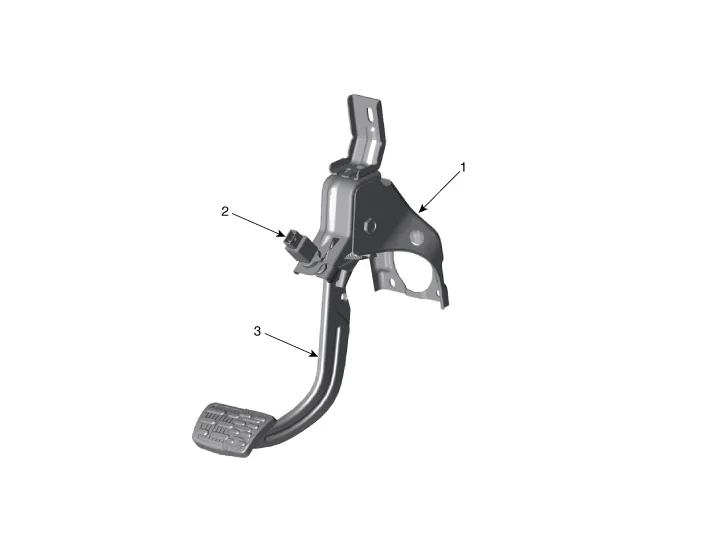
| 1. Brake member assembly 2. Stop lamp switch |
3. Pedal assembly |
Repair procedures
| Removal |
| 1. |
Switch "OFF" ignition and disconnect the negative (-) battery terminal. |
| 2. |
Remove the crash pad lower panel. (Refer to Body - "Crash Pad Lower Panel") |
| 3. |
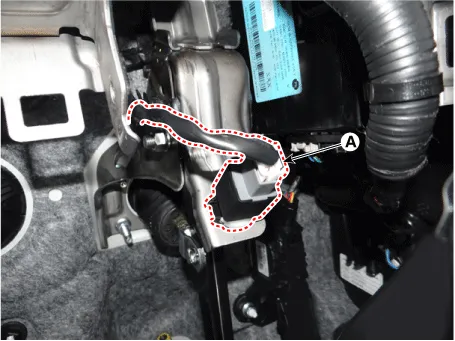
Disconnect the brake switch connector (A).
|
| 4. |
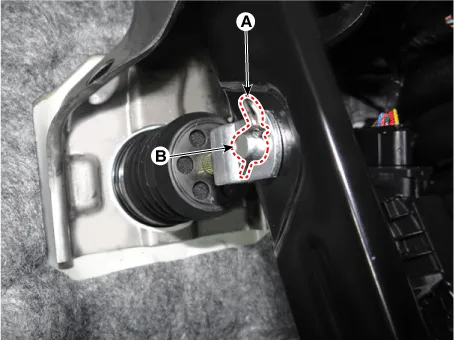
Disconnect the snap pin (A) and clevis pin (B).
|
| 5. |
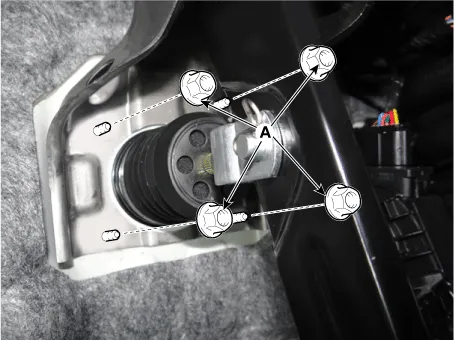
Remove the brake pedal mounting nuts (A).
|
| Inspection |
| 1. |
Check the bushing for wear. |
| 2. |
Check the brake pedal for bending or twisting. |
| 3. |
Check the brake pedal return spring for damage. |
| Installation |
| 1. |
Install in the reverse order of removal |
Components and components location Components Repair procedures Removal 1. Disconnect the brake fluid level switch connector (A) and then remove the reservoir cap.
Components and components location Components 1. Caliper body 2. Caliper carrier 3. Brake pad assembly [IN] 4.
Other information:
Kia Rio 2017-2023 YB Service Manual: Instrument Cluster
Components and components location Components [Standard Type ("3.5")] [Supervision Type ("3.5")] Connector Pin Information Connector A No.
Kia Rio 2017-2023 YB Service Manual: Power Door Locks
Components and components location Component Location 1. Driver power window switch 2. Assist power window switch 3 . Body Comtrol Module (BCM) 4 . Tailgate actuator 5 . Door latch lock actuator 6 .
Categories
- Manuals Home
- Kia Rio Owners Manual
- Kia Rio Service Manual
- Engine Mechanical System
- Normal Condition
- Suspension System
- New on site
- Most important about car
