
Kia Rio: Power Train / Air Cleaner Filter
Repair procedures
| Inspection |
| 1. |
Remove the air cleaner element. |
| 2. |
Check that the air filter is excessively dirty. If the air filter is excessively dirty, replace the air cleaner element. |
| 3. |
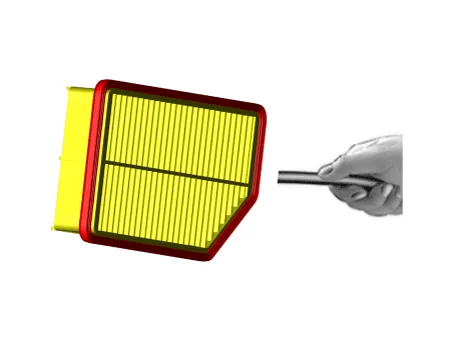
If the air cleaner element needs to be cleaned, blow compressed air as shown in the illustration to clean it.
|

| 4. |
Reinstall the air cleaner element. |
| Replacement |
| 1. |
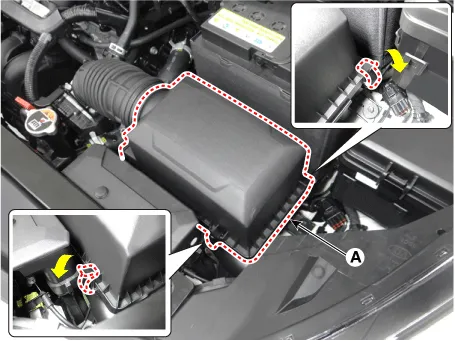
Open the air cleaner element cover (A) by unlocking the clamp.
|
| 2. |
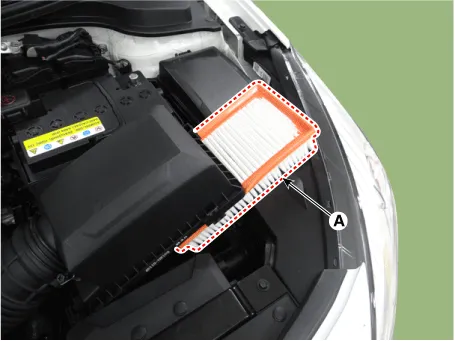
Replace the air cleaner element (A) with a new one.
|
| 3. |
Close the air cleaner cover by hooking the clamps. |
Repair procedures Inspection Battery Voltage and Status Check the battery voltage and status using the battery tester. Battery Terminal 1.
Other information:
Kia Rio 2017-2023 YB Service Manual: Vanity Lamp
Repair procedures Removal 1. Disconnect the negative (-) battery terminal. 2. Detach the vanity lamp (A) using a flat-tip screwdriver. 3. Disconnect the vanity lamp connector (A).
Kia Rio 2017-2023 YB Service Manual: Rear Wiper/Washer
C
Categories
- Manuals Home
- Kia Rio Owners Manual
- Kia Rio Service Manual
- CVVT & Camshaft
- Brake System
- Steering System
- New on site
- Most important about car
